
A directory tool turns dispersed content into a structured, searchable directory experience. It can organize providers, products, services, resources, locations, or any kind of listing data into categories and profiles that are easier to browse than standalone pages or blog posts.
As a lead-capture mechanism, a directory generates intent signals through search behavior. Visitors reveal what they need by how they filter, compare, and click, while optional “shortlist,” “request help,” or “contact provider” actions capture qualified lead details tied to a clearly defined interest.
Typical Features and Functions
The AI Advantage for Tool Owners
- Enriches directory activity with inferred intent signals based on searches, filters, and comparisons
- Helps visitors refine searches through natural-language prompts and guided recommendations
- Identifies high-value leads by detecting urgency and high-fit browsing patterns
- Generates follow-up summaries and routing details based on what the visitor actually explored
A typical directory tool can:
- Convert existing content into standardized listings (profiles, categories, tags, locations, service types)
- Provide keyword search plus filters (category, region, specialty, price tier, certification, availability)
- Support listing pages with structured fields (overview, capabilities, industries served, contacts, links)
- Enable comparison and shortlists (save favorites, side-by-side views, export/share a shortlist)
- Offer lead-capture actions at high-intent moments (contact request, quote request, “help me find” form)
- Track engagement by listing and category for reporting, lead scoring, and content optimization
A directory tool offers additional benefits for the user:
- Faster discovery compared to browsing scattered pages or generic search results
- A consistent format for evaluating options across multiple providers or listings
- Clear categorization that reduces time spent defining what to search for
- Better confidence through structured details (scope, region, specialties, proof points, constraints)
- Practical ways to narrow choices (filters, tags, shortlists, comparison views)
- A simple path to get help finding the right match without starting a sales conversation too early
Application Examples
The Problem: Buyers need specialized providers but struggle to locate credible options and compare them consistently.
The Solution: A directory standardizes provider profiles, enables filtering, and captures high-intent contact requests tied to specific needs.
The Problem: Product and software evaluation is time-consuming when features and fit information are scattered and inconsistent.
The Solution: A directory organizes listings into comparable profiles and categories, making it easier to shortlist and request demos or quotes.
The Problem: Resource pages grow over time and become difficult to search, especially when users don’t know the right keywords.
The Solution: A directory structure adds taxonomy, filters, and AI-guided navigation to help users quickly find the right content.
The Problem: Associations and partner programs struggle to showcase members and drive meaningful connections.
The Solution: A directory highlights member capabilities and routes inquiries to the right contacts while capturing context for follow-up.
The Problem: Visitors need local or regional services but can’t easily determine coverage, availability, or specialization.
The Solution: A directory supports location-based filtering and structured service categories, then captures requests with geography and scope details.
The Problem: Buyers often have nuanced needs that don’t fit simple filters, leading to abandonment or low-quality inquiries.
The Solution: AI-assisted prompts translate open-text requirements into structured filters and recommended matches, improving conversion and lead quality.
Possible Use Cases
*Organize consultants, auditors, agencies, or advisors by specialty and industry focus
*Capture “match me” requests tied to timelines, scope, and geography
*List courses, providers, delivery formats, and regional availability in a searchable catalog
*Capture requests based on role, objectives, and scheduling constraints
*Create directories for clinics, programs, providers, or community resources with eligibility filters
*Capture inquiries with structured needs and referral context
*Organize contractors and service providers by trade, service level, and coverage areas
*Capture quote requests with job type, site count, and timeline
*List vendors and service providers by capabilities, compliance scope, and environment fit
*Capture requests based on standards, maturity level, and target outcomes
*Create directories for sponsors, solutions, or expert resources tied to editorial categories
*Capture high-intent inquiries driven by what content and listings were explored
Example: Management Systems Service Directory
Organizations exploring management system certification, improvement programs, or supporting software often need a fast way to identify credible options across multiple categories. This directory focused on management systems services and reduced research time by organizing providers into clear buckets (such as consultants, registrars, and software) and presenting profiles in a consistent format that supports quick evaluation.
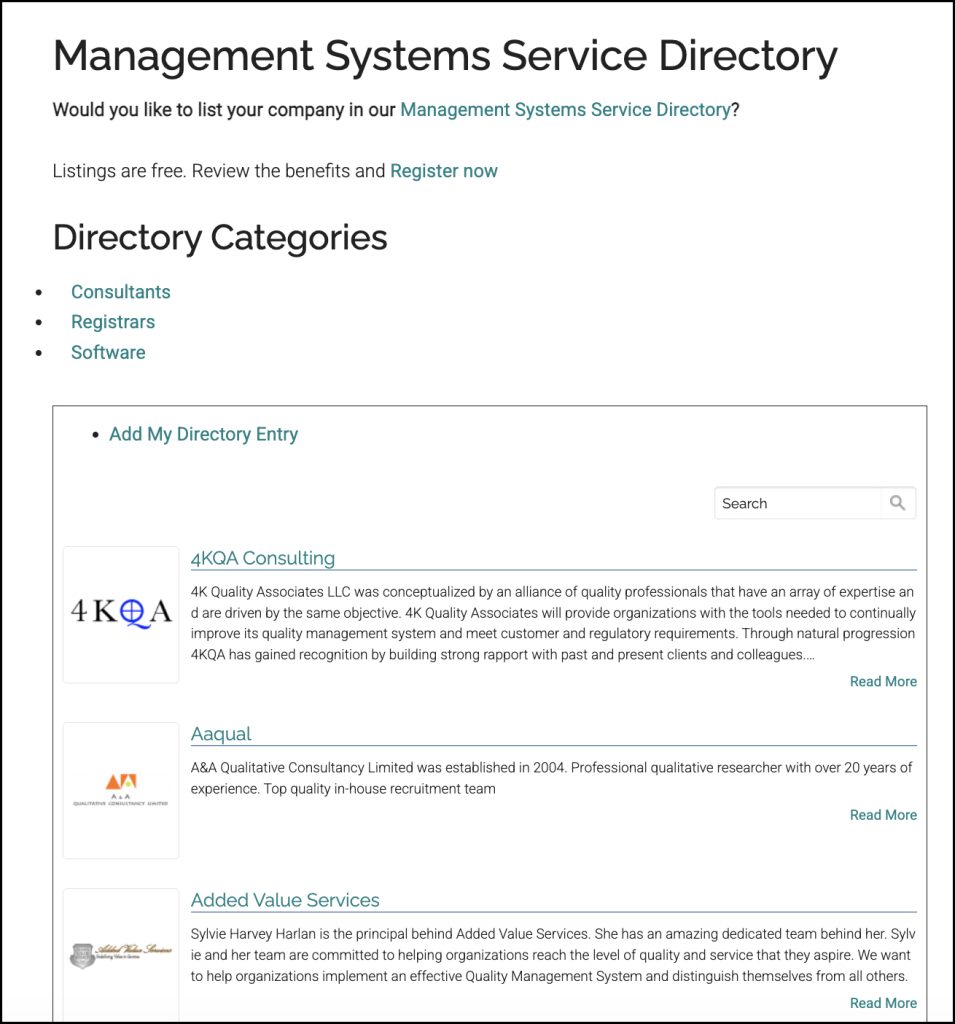
This Management Systems Service Directory provides a central place to browse and search for service providers based on what a team is trying to accomplish, rather than forcing visitors to hunt across scattered pages and unrelated search results. It supports lead capture by converting directory behavior into intent signals and by creating natural “contact” moments once a visitor has narrowed choices.
For providers, listing in a directory like this can expand visibility and generate inbound opportunities from visitors who are actively searching for services. Listing and registration workflows can also be used to keep entries accurate over time and to unlock additional benefits such as co-promotion, inclusion in related campaigns, or adding related tools to a provider’s website under private label—depending on the program design.
This tool was offered free to a company looking for new ways to offer useful content and capture more qualified leads.
Existing Core Capabilities in This Tool Template
- Directory schema builder for any listing type (providers, products, resources, locations, services)
- Content ingestion options (manual entry, bulk upload, scraping/collection workflows, ongoing updates)
- Taxonomy and tagging (categories, specialties, industries, geography, attributes, keywords)
- Search and filtering (keyword search, multi-filter, sorting, saved searches)
- Listing profile pages (structured fields, links, contacts, media, highlights, proof points)
- Conversion tools (shortlists, comparison views, “request help finding” form, contact/quote requests)
- AI-assisted browsing (natural-language search, guided refinement, recommended matches)
- Engagement tracking and analytics (top searches, filter usage, listing views, conversion paths)
- Lead scoring and routing rules based on browsing behavior and captured context
- Admin moderation and governance (approvals, edits, spam control, versioning, expirations)
- Integrations (CRM/marketing automation, webhooks/API, attribution, retargeting pixels)
- Provider self-service portal (register, edit listings, add details, manage contacts)