
A cost calculator is an interactive estimator that translates a visitor’s inputs into a structured cost range, a recommended package, or a scoped “starting point” estimate. These tools are used across industries to reduce friction in early-stage buying decisions, standardize quote requests, and convert vague inquiries into usable requirements.
As a lead-capture mechanism, a cost calculator does more than collect contact info. It captures the context behind the request (scope, urgency, constraints, priorities), produces a usable output for the visitor (an estimate and next steps), and creates a higher-quality inbound lead record for the tool owner—often with clear qualification signals and a natural reason to follow up.
Typical Features and Functions
The AI Advantage for Tool Owners
- Enriches calculator submissions with structured intent and scope signals
- Identifies high-value leads based on urgency, complexity, and fit indicators
- Generates consistent summaries for sales follow-up, reducing manual triage time
- Supports segmentation for automated nurturing based on estimate profile and needs
A typical cost calculator can:
- Ask a short series of scoping questions (size, volume, locations, timeline, service level)
- Convert answers into an estimate range using configurable rules and pricing logic
- Display line-item breakdowns (options, add-ons, assumptions, exclusions) where appropriate
- Offer scenario comparisons (good/better/best packages, phased rollouts, “minimum viable” scope)
- Export or email a summary of inputs and results for internal sharing
- Capture lead details at the right moment (before or after results) with clear value exchange
An AI-based cost calculator tool offers additional benefits for the user:
- Plain-language explanations of what drives cost up or down for the chosen scenario
- Help selecting inputs when uncertainty exists (guided prompts, examples, definitions)
- Real-time “what changed?” reasoning when options are toggled or scope shifts
- Suggested next-step actions tied to the estimate profile (timeline planning, prerequisites, data needed)
- Automated consolidation of open-text inputs into clean, structured requirements
- Smarter result presentation that adapts to visitor type (buyer, technical evaluator, procurement)
Application Examples
The Problem: Early inquiries often lack the scope details required for a meaningful quote, creating back-and-forth that slows response time and reduces conversion.
The Solution: A calculator gathers structured inputs, produces an estimated range with assumptions, and delivers a clear summary that supports faster, more consistent follow-up.
The Problem: Prospects frequently request “a price” before deciding what a realistic phase 1 scope should include.
The Solution: A calculator offers phased scenarios (starter, standard, accelerated), clarifies tradeoffs, and produces an estimate aligned to each option.
The Problem: Visitors struggle to choose between service tiers when differences are described only in marketing language.
The Solution: A calculator maps inputs to the most appropriate tier, explains why, and quantifies upgrade/downgrade impacts.
The Problem: Many buyers need a defensible budget range to secure internal approval before requesting formal proposals.
The Solution: A calculator provides a shareable estimate output that documents assumptions and input logic, supporting internal business cases.
The Problem: High-consideration services attract submissions that vary widely in fit, urgency, and readiness, overwhelming response capacity.
The Solution: A calculator standardizes submissions, surfaces readiness signals, and routes leads based on size/fit/urgency thresholds.
The Problem: Traditional “request a quote” forms capture contact details but miss the context that determines whether a quote is feasible.
The Solution: A calculator replaces generic forms with structured intake, producing both an estimate for the visitor and a complete requirement snapshot for the seller.
Possible Use Cases
*Estimate scope and pricing ranges for advisory, implementation, or managed service packages
*Capture constraints, timeline drivers, and expected deliverables for faster qualification
*Estimate project costs based on site count, complexity, equipment type, and schedule urgency
*Standardize intake fields that typically require phone calls or site visits to clarify
*Estimate program costs using environment size, coverage needs, and service model preferences
*Route leads by readiness indicators (existing controls, compliance deadlines, resourcing gaps)
*Estimate projects based on square footage, asset age, site distribution, and improvement targets
*Produce scenario comparisons to support phased budgeting and procurement planning
*Estimate services using risk profile, footprint, audit frequency, and documentation requirements
*Capture compliance drivers and deadlines to prioritize high-urgency opportunities
*Estimate training bundles by headcount, delivery method, role mix, and course combinations
*Convert training interest into a structured plan that supports follow-up and scheduling
Example: ISO Certification Cost Calculator
ISO 9001 is an international standard for adherence to quality management through creation and execution of a quality management system. Those seeking certification to this standard must pass a third party audit of their quality management systems, performance, training and support levels. Companies use a variety of different certification tools to assess their readiness, all with varying costs. Registration, consulting, auditing, and training can be very costly to organizations, and using a cost estimator tool helps with budgeting and overall certification planning.
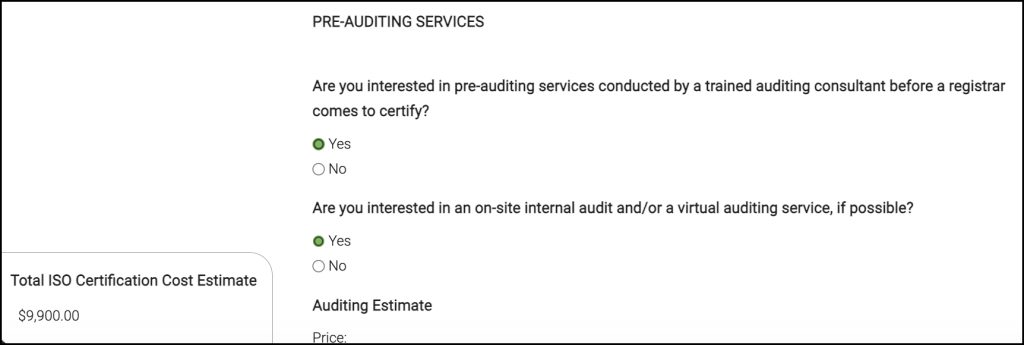
It offers more accurate pricing because of constant feedback from real contracts for these services. Users can send an email of the results if they wish to share it internally.
Existing Core Capabilities in this tool template
- Configurable question flows (multi-step, conditional branching, required/optional logic)
- Pricing rules engine (ranges, tiers, add-ons, multipliers, minimums, bundled packages)
- Input components (picklists, sliders, checkboxes, numeric ranges, file/link fields, short text)
- Results formatting (range + assumptions, line-item breakdown, package recommendations)
- Scenario comparison outputs (tier comparisons, phased approaches, option toggles)
- Lead capture gating (before results, after results, or “email me the results” flow)
- Export and sharing (email summary, PDF-style report view, CRM-ready payload)
- Admin controls (versioning, question edits, pricing updates, A/B testing support)
- Tracking and analytics (drop-off points, completion rate, estimate distribution, source attribution)
- Integrations (CRM/marketing automation handoff, webhooks/API, routing rules by lead profile)
This tool was offered 100% free on a website that was able to track and monitor user interaction. Leads for people interested in purchasing a variety of different ISO services were captured using this tool, immediately providing down funnel qualification for their sales team.