
AI-enabled lead qualification tools are not simple widgets or chatbots. They are structured, evolving systems designed to solve real problems for users while capturing high-value behavioral and intent data for sponsors. Their effectiveness depends as much on how they are designed and governed as on how they are promoted and integrated. The workflows shown below illustrate two complementary phases: tool construction and tool deployment.
Phase 1: Tool Construction
The Impact of Generative AI Sales Lead Production
AI qualification tools are not meant to be individual plug-and-play widgets but individually designed/adapted, ideally as part of a broader system that includes:
- User entry points
- Interaction environments
- Data capture and scoring
- Reporting and handoff
- Continuous improvement
Defining objectives, inputs, and outputs
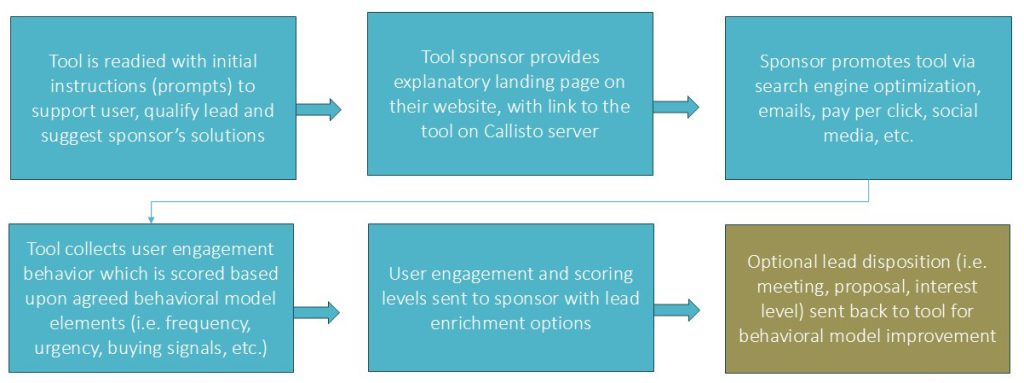
Tool construction begins with a collaborative definition phase between the sponsor and the tool creator. This step establishes what the tool is meant to do and may include estimating cost, identifying gaps, comparing options and timetables. The phase requires defining:
- Tool objectives (qualification, education, prioritization, etc.)
- Target audience and roles
- What metrics will determine success
- What inputs the tool user will provide
- What outputs the user will receive
- What engagement signals will be captured
Initial tool structure and logic design
Once requirements are clear, the tool creator proposes an initial structure: how the interaction flows, how questions are sequenced, how prompts guide the AI, and how scoring logic will operate. This proposal is refined with sponsor input to reflect industry language, regulatory context, and preferred positioning. At this stage, emphasis is placed on clarity and restraint—asking only what is necessary to generate meaningful insight while keeping the user experience intuitive.
Prototype and iterative development
An initial working version or minimum viable product (MVP) of the tool is then created with basic functionality. The MVP version of the tool is specifically created to validate interaction flow, test scoring assumptions, review AI behavior and gather internal feedback. Based on feedback and observation:
- Prompts are refined
- Scoring logic is adjusted
- Outputs are clarified
- UX friction is reduced
This is not a finished product; it is a learning instrument. Early iterations allow both parties to observe how real users engage, where confusion arises, and which signals are most predictive of interest. Iteration is expected and encouraged as changes at this stage are faster, cheaper, and more impactful than after full release.
MVP release and controlled testing
Once core functionality is validated, a minimum viable product (MVP) is released with limited exposure. This allows internal stakeholders—and later a small external audience—to test the tool under real conditions without risking brand or data issues. The MVP phase focuses on:
- User interface
- User engagement
- Output quality
- Scoring accuracy/early buying signal reliability
- Steps required to full release and continuous improvement
After testing by sponsor and creator, the tool is released more broadly (but ideally in a stepwise exposure) and monitored continuously. User behavior, output errors, engagement patterns, and scoring outcomes are tracked to inform ongoing improvements. Updates are not one-time events; they are a natural part of operating an AI-enabled system.
Phase 2: Tool Deployment
Initial tool set into production
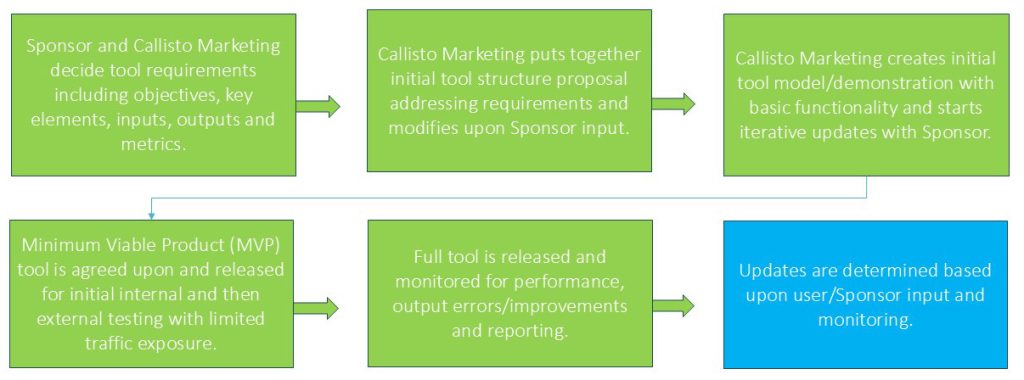
Deployment begins with finalizing the initial prompts and system instructions that guide the AI. These prompts determine how the tool supports the user, how it frames questions, and how it introduces sponsor solutions when appropriate. Because prompt management is non-coding, refinements can be made quickly as insights emerge.
Sponsor landing page and positioning
The sponsor provides an explanatory landing page on their own website that frames the tool’s purpose, value, and intended audience. This page sets expectations and establishes trust before users enter the tool, which is hosted in the tool creator’s secure environment. This separation reduces security risk while preserving brand continuity.
Promotion and traffic generation
The sponsor controls how the tool is promoted—via SEO, email campaigns, paid media, social channels, webinars, or partner sites. Unlike static downloads, the tool can be promoted as an interactive resource rather than gated content, increasing engagement quality. Common channels include:
- Search engine optimization
- Paid search and display
- Email campaigns
- Social media promotion
- Event and webinar follow-ups
Because tools provide intrinsic value, they can be promoted as resources rather than gated assets.
Engagement capture and scoring
As users interact with the tool, engagement behavior is captured and scored based on agreed models. Signals such as frequency, depth, urgency, and buying indicators are converted into structured scores that reflect buyer readiness and priority.
Data delivery and enrichment
Qualified engagement data is transmitted to the sponsor in structured form, with optional enrichment layers such as CRM history or third-party intent data. This ensures sales receives context, not just contact details.
Feedback loop for model improvement
Optionally (but ideally), sponsor feedback—such as meeting outcomes or proposal status—can be fed back into the system to refine scoring logic. Over time, the tool becomes more predictive and more aligned with real sales outcomes. After launch, tools continue to evolve based on:
- User behavior
- Sales outcomes
- Market/business changes
- Tool integrations and performance
Typical tool management/operational responsibilities
| Area | Tool Sponsor Responsibilities | Tool Creator Responsibilities |
|---|---|---|
| Objectives & Use Cases | Define business goals, audience, success criteria | Translate goals into tool logic and structure |
| Subject Matter Input | Provide domain expertise, terminology, positioning | Embed expertise into prompts and scoring logic |
| Branding & Positioning | Create landing pages, messaging, promotion | Maintain neutral, value-first tool experience |
| Promotion & Traffic | Drive traffic via SEO, email, media, partners | Ensure tool stability and scalability |
| AI Logic & Prompts | Review and approve guidance approach | Design, test, version, and optimize prompts |
| Hosting & Security | Approve deployment model and data handling | Host tool securely, monitor models and outputs |
| Lead Scoring & Reporting | Define what constitutes a qualified lead | Implement scoring, reporting, and exports |
| CRM & Enrichment | Specify integration needs | Support data delivery and enrichment options |
| Ongoing Feedback | Share sales outcomes when available | Use feedback to refine models and scoring |
During tool creation, typically Sponsors focus on areas including tool positioning/promotion, subject matter expertise/tool improvement suggestions, sales engagement and outcome feedback. The tool creator typically manages areas such as tool production and hosting, AI monitoring, Prompt implementation and improvement and tool performance optimization.
Next step
Leadsahead works with sponsors to design deployment models aligned with their infrastructure, policies, and goals.
Request a proposal to define the optimal deployment approach for your AI qualification tools.